
- 1:Tails OS — The Gold Standard for Portable Anonymity
- 2:Whonix — Tor Without the Reboot
- 3:Tor Browser — Instant Portable Anonymity
- 4:Kasm Workspaces — A Browser Inside a Browser
- 5:Neko — Self-Hosted Remote Browser for Collaborative Privacy
- 6:A VPS as Your Privacy Layer — Infrastructure First
- 7:Signal — The Messenger That Doesn't Store Your Secrets
- 8:Session — Signal Without the Phone Number
- 9:Briar — Mesh Messaging for Infrastructure Blackouts
- 10:Mullvad Browser + Mullvad VPN — The Everyday Stack
- 11:The Honest Closing
Ghost Mode: A Candid Deep Dive Into 10 Privacy Tools That Actually Work Privacy & Security
Whether you're a journalist in a hostile environment, a whistleblower with something real to say, or someone operating under legitimate surveillance pressure — here's your operational toolkit, vetted for credibility and real-world usability.
Privacy isn't paranoia. It's infrastructure.
If you're working on something that powerful people don't want exposed, communicating with someone you shouldn't have to hide, or operating in a workplace or country where surveillance is normalized—the question isn't whether to protect yourself. It's how, and with what trade-offs.
This series covers ten tools across operating systems, browsers, messaging, and infrastructure. Each section goes deep: not just what it does, but what it costs in speed, usability, or trust. No marketing language. No false security promises. Just an honest assessment of what works when attribution matters.
The weakest link in any privacy stack is behavior. These tools don't make you invisible—they make you expensive to track. The difference matters.
Tails OS — The Gold Standard for Portable Anonymity
Tails is the privacy operating system. Not a tool you run inside another OS, but a complete bootable environment that routes everything through Tor, leaves zero forensic trace when shut down, and was explicitly designed for people whose operational security actually matters.
The setup is straightforward: you create a bootable USB stick from an ISO image (takes about 10 minutes), plug it into any computer, reboot, and you're running a complete Linux environment isolated from the host machine's OS and storage. Everything runs in RAM. When you shut down, the RAM clears. No logs to forensic recovery. No cached history on the host. Nothing to find.
Cost: Free
Type: Bootable OS
Learning Curve: Moderate
Portability: Full
Tails was built by a collective of privacy advocates and developers specifically for journalists, activists, and whistleblowers. Edward Snowden used it. Glenn Greenwald recommended it. The EFF endorses it. This isn't theory—it's battle-tested in actual high-stakes environments.
Here's what makes it different from just running Tor Browser on a regular computer: Tails doesn't trust the underlying OS. It doesn't write to the host machine's disk. Every application on Tails is configured to route through Tor by default—not as an option, but as the mandatory baseline. If you try to access a website over unencrypted HTTP, Tails will block it. You can't accidentally leak your IP. You can't forget to enable encryption. The operating system enforces the security model.
Tails also comes with built-in encrypted storage (LUKS), secure file deletion tools (shred), and pre-configured encrypted messaging apps—Signal, Riot (now Element), and others. If you need to pass files between Tails sessions, you can use Persistent Storage, which lives on an encrypted partition of your USB drive, separate from the live session.
The killer limitation is the reboot requirement. If you're using someone else's computer—a borrowed laptop, a library machine, a corporate workstation—you need administrative rights to boot from USB, and the reboot is visible. In some environments, that visibility is itself a problem. Corporate IT will notice. Border guards will notice. The value of invisibility disappears if the process itself is conspicuous.
The second limitation is speed. Tails runs entirely in RAM on top of a live system, which means no disk cache, no optimization, and network traffic moving through three Tor relays adds latency. Watching video is sluggish. Downloading large files is deliberate. For occasional use—a few hours of secure browsing or messaging—this is fine. For an 8-hour workday, it becomes friction.
There's also the trust model. Tails is open source and regularly audited, but you're trusting that the distributions haven't been compromised at the package level, that the developers haven't inserted backdoors, and that no state-level actor has found zero-days in the stack. For most threats, that's a reasonable trust boundary. For adversaries with nation-state resources, nothing is completely safe.
Tails is the right choice when anonymity is the entire point of the session. Writing a leak, reaching out to a journalist anonymously, accessing sensitive information that would be dangerous if tied to your identity—these are Tails scenarios. It's not designed for hybrid use (partly anonymous, partly you) because that hybrid approach weakens anonymity.
Recent updates have added better support for modern hardware, improved internationalization, and streamlined the Persistent Storage setup. The project is actively maintained, which is critical for security tools—abandoned projects with unknown vulnerabilities are liabilities.
When Tails Wins
- Maximum anonymity with minimal setup
- Zero forensic trace on host
- Tor routing enforced system-wide
- Use any computer, no installation
- Battle-tested by journalists
Real Costs
- Requires administrative reboot (visible)
- Tor latency makes everything slower
- Not designed for long sessions
- Can't blend anonymous with identified activity
- Still trusts hardware/BIOS
Whonix — Tor Without the Reboot
If Tails is the nuclear option, Whonix is the option for people who need to do actual work while remaining anonymous. It's a pair of virtual machines—a gateway VM that routes all traffic through Tor, and a workstation VM that can only reach the internet through the gateway. Even if the workstation is compromised, your real IP never leaks because there is no pathway to the host network.
The architecture is elegant: the workstation doesn't know its real IP address. It has no direct network access. The gateway doesn't run user applications—it's pure routing infrastructure. This isolation means a compromise in the workstation can't pivot to reveal your identity. The gateway can't pivot down into the workstation to spy on your activity. They're separated by the hypervisor.
Cost: Free
Type: Virtual Machine
Learning Curve: High
Portability: Partial
Whonix runs on VirtualBox (free) or KVM (Linux-native). If you use portable VirtualBox plus an external SSD with a Whonix VM image pre-loaded, you can carry a complete anonymous workstation on a 500GB external drive and run it on any computer without installation. That's a meaningful advantage over Tails for people who need to do sustained work—researchers digging through documents, developers coding, writers working on a leak.
The usability difference is significant. Whonix sits in a window on your desktop alongside your regular applications. You can copy-paste between environments. You can keep multiple windows open. The workstation VM can have 4GB of RAM, proper disk space for caching, and you're not restarting your entire computer. For a research session that lasts 4 hours, Whonix is dramatically more practical than Tails.
The setup is harder than Tails. You need to understand virtualization, allocate resources (RAM, disk) properly, and know how to boot into the VMs. If you mess up the network configuration, you might accidentally leak your real IP before you realize it. There are guides, but the barrier to entry is higher—this isn't for security beginners.
The trust model is more complex. You're trusting the hypervisor (VirtualBox or KVM), the host OS, and the two VMs. A compromise at the BIOS or hardware level could potentially bypass all the isolation. But within the application layer, the architecture is sound—assuming the hypervisor itself hasn't been subverted.
Whonix can be made truly portable, but it requires planning. Download a portable VirtualBox build, create an external drive structure with the VMs pre-configured, and test it before relying on it for high-stakes work. The effort is justified if you need to work across multiple machines without installing software.
Whonix is the right choice when you need the anonymity properties of Tails but the usability of a full desktop environment. Sustained work—research, writing, development—benefits from Whonix. One-off anonymous browsing sessions favor Tails.
When Whonix Wins
- Usable for 4+ hour sessions
- No reboot required
- Good isolation between layers
- Can use external SSD for portability
- Tor routing enforced at network layer
Real Costs
- Higher initial complexity
- Requires capable host hardware
- VM setup can leak IP if misconfigured
- Still trusts hypervisor and BIOS
- Portable setup requires external drive
Tor Browser — Instant Portable Anonymity
Most people who've heard of Tor think of it as slow, bureaucratic, and designed for criminals. That reputation is both outdated and useful—outdated because the network has significantly improved, useful because the stigma keeps casual surveillance out of the Tor user base.
Tor Browser is the simplest entry point. Download it, run it, browse. No installation, no rebooting, no virtual machines. It routes your traffic through three Tor relays, strips identifying headers, blocks JavaScript by default, and disables plugins that could leak your identity. In strict security mode, it breaks some websites deliberately—because those websites use techniques that could be used to fingerprint you.
Cost: Free
Type: Browser
Learning Curve: None
Portability: Full
The portability is official and supported. You can download Tor Browser as a ZIP file, put it on a USB drive, plug it into any machine, and run the executable. No installation, no trace left on the host computer (if you don't save anything). For quick anonymous access to a website, this is the friction-free option.
Tor's main weakness is network speed. Traffic goes through three relays before reaching the destination server, and geographic latency compounds. Watching video on Tor is painful. Downloading files is deliberate. For reading text-based websites, checking email, or low-bandwidth operations, it's acceptable. For anything requiring sustained bandwidth, it's a problem.
The second issue is that Tor exit nodes (the final relay between you and the destination) are run by volunteers. Some are compromised, some are run by researchers studying Tor, some are run by government agencies collecting metadata. Your traffic is encrypted from your browser to the Tor network, but the exit node sees the destination server's response in cleartext. If you're accessing an HTTPS website, the content is encrypted end-to-end, so the exit node can't read the data. If you're accessing HTTP, it can. This is why Tor Browser blocks insecure sites.
Many websites actively block Tor exit nodes. Banks, streaming services, and platforms worried about abuse often refuse connections from known Tor IPs. This is a practical limitation—Tor won't work for authenticating to your regular accounts without exposing your identity.
Tor Browser is actively maintained by the Tor Project (a 501(c)(3) nonprofit) and regularly updated. The project has a proven track record and genuine credibility in security research. It's been audited. It's the browser of choice for journalists in hostile environments because it's simple, portable, and battle-tested.
Use Tor Browser for accessing websites anonymously without leaving your normal environment. It's the entry point for people who want anonymity for a specific action—checking a secure drop, reading news from a censored country, accessing something that could be problematic if tied to your identity.
When Tor Browser Wins
- Zero friction entry point
- Fully portable, no installation
- Battle-tested and audited
- Enforces secure defaults
- Good for one-off anonymous access
Real Costs
- Slow (exit node latency)
- Many sites block Tor IPs
- Exit nodes can see unencrypted traffic
- Can't use for authenticated logins safely
- Bandwidth-heavy operations painful
Kasm Workspaces — A Browser Inside a Browser
Kasm is conceptually simple: instead of browsing from your machine, you stream a full desktop environment or isolated browser from a remote server. What you see is a video of the remote machine's screen. What the local network sees is HTTPS traffic to a Kasm server. The difference is subtle but powerful in workplace environments where network inspection happens.
Imagine this scenario: you're working from a corporate office. The IT department monitors outbound traffic. Tor is blocked. VPNs are forbidden. If you open Tor Browser, it's instantly detected. But if you open a regular browser and navigate to a Kasm instance running on a cloud server, IT sees normal HTTPS traffic to a cloud provider. Inside the Kasm session, you can browse the full internet over the remote server's connection. From IT's perspective, you opened a web app. What happened inside that web app is outside their inspection.
Cost: Free to $200+/mo
Type: Remote Container Streaming
Learning Curve: Low
Portability: Browser-based
Kasm comes in three flavors: self-hosted open source (free, requires a server), self-hosted enterprise (paid, with more features), and their managed cloud service (monthly subscription). For privacy purposes, self-hosted on a VPS you control is the model that makes sense—you're not trusting Kasm's infrastructure with session data.
The technical architecture is clean. Kasm runs in Docker containers on your server. Each session gets an isolated container with a full desktop environment (Firefox, desktop OS, etc.) or a lightweight browser-only container. The container runs X11, and Kasm streams the display to your browser via a web socket. Your keyboard and mouse input go back to the server. From the perspective of the internet, the remote server is doing the browsing, using its IP, its connection, its fingerprint. Your machine is just a viewer.
The limitation is latency and responsiveness. There's inherent delay in streaming a desktop, and for tasks requiring real-time feedback (gaming, video editing), it's noticeable. For browsing, email, and document work, it's acceptable. The other limitation is that Kasm requires active server resources—you're paying for the VPS whether you use it or not.
The security model depends on trusting your VPS provider and the network between you and the server. If the VPS provider is compromised, or if someone is able to intercept traffic between you and the server (unlikely if you use HTTPS, but theoretically possible with nation-state capability), they could observe your activity. Kasm is also not designed to provide anonymity from the destination server—the server sees requests from the Kasm instance's IP, not your IP. If you want anonymity all the way to the destination, you'd run Tor Browser inside a Kasm session.
A recent trend in the privacy community is using Kasm in combination with other tools. Run a Kasm session on a hardened VPS, then run Tor Browser inside that Kasm session, and you've created a remote anonymity layer that works in workplace environments where Tor is directly blocked.
Kasm is the right choice when you need to hide your browsing behavior from local network inspection. Workplace, school, or home networks with monitoring—these are Kasm scenarios. It's not designed for anonymity from the destination server, but for separating your local activity from your internet activity.
When Kasm Wins
- Bypasses network-level filtering
- Looks like normal web traffic to IT
- Full desktop environment available
- Can layer with Tor for anonymity
- Self-hosted (you control the server)
Real Costs
- Requires VPS (monthly cost)
- Latency for interactive work
- Trusts VPS provider and network
- Session data on remote server
- Not anonymity from destination
Neko — Self-Hosted Remote Browser for Collaborative Privacy

Neko is the open-source, lightweight cousin of Kasm. It's a single application that streams a remote browser to your local browser window. No installation, no containers, just a server running n.eko (usually pronounced "nay-ko") that you access through your web browser.
The simplicity is the draw. Download a Docker image, run it on a VPS, access it through your browser, and you have a remote browser that works like Kasm but with less overhead and simpler setup. Neko is designed for collaborative browsing—multiple people can share the same browser session simultaneously, making it useful for security-conscious teams doing research or analysis together.
Cost: Free (OSS)
Type: Lightweight Remote Browser
Learning Curve: Moderate
Portability: Browser-based
Neko uses H.264 or VP9 video codecs to stream browser output, which is more efficient than Kasm's approach. If you have a modest VPS (2GB RAM, 1 CPU), Neko will run comfortably. The setup is minimal—a docker-compose file and you're operational within minutes.
The collaborative aspect is genuinely unique. If you're working with a journalist, researcher, or activist in another country, you can give them access to a Neko session. You're all looking at the same browser, able to see what each person is doing in real time. For distributed teams that need to operate securely, this is powerful. For solitary privacy, Kasm or a VPS-hosted Tor Browser might be sufficient.
The limitations are similar to Kasm: latency, trust in the VPS provider, and the need for active server resources. Neko is younger and less battle-tested than Kasm, which means it's had fewer security audits. For privacy-sensitive work, the Kasm ecosystem is more mature. For open source ideological reasons or lighter workloads, Neko is compelling.
One practical note: Neko doesn't include built-in encryption for session data. If your VPS provider is monitoring traffic, they could potentially observe what's happening in the browser. You'd want to run Neko over a VPN or within an encrypted tunnel to add that layer. Kasm includes better built-in encryption by default.
Neko is best for collaborative, open-source-first teams that want a lightweight remote browser for group analysis or research. If you're working alone, Kasm's maturity and encryption might be better. If you're ideologically committed to open source and don't mind the extra setup, Neko is compelling.
When Neko Wins
- Lightweight open source
- Excellent for collaboration
- Fast setup with Docker
- Lower resource requirements
- Active development community
Real Costs
- Younger project, less audited
- No built-in encryption for sessions
- Requires VPS setup knowledge
- Monthly VPS cost
- Less documentation than Kasm
A VPS as Your Privacy Layer — Infrastructure First
A Virtual Private Server (VPS) isn't a privacy tool by itself—it's infrastructure you can use to build privacy tools. The principle is straightforward: you control a server in a jurisdiction with better privacy laws, you route your internet activity through that server, and you're using that server's IP and connection instead of your own.
VPS providers matter. A mainstream provider (AWS, Google Cloud, DigitalOcean) will cooperate with law enforcement and hand over logs without resistance. A privacy-focused provider (Mullvad, 1984 Hosting, Njalla) explicitly doesn't keep logs, has resisted subpoenas, and operates in jurisdictions where they have legal grounds to refuse. The choice of provider is security-relevant.
Cost: $3-$20/month
Type: Infrastructure
Learning Curve: High
Portability: Full
The best privacy-focused VPS providers accept Monero or prepaid cards for payment, don't require email verification tied to your identity, and have explicit no-logs policies. Mullvad Hosting (run by the Mullvad VPN people) is known for this. 1984 Hosting (Iceland, strong data protection laws) offers it. Njalla (privacy-forward) is another option. These providers have been tested by activists and journalists and have held up under legal pressure.
What can you do with a VPS? Run Neko or Kasm for remote browsing. Host a private VPN. Set up a proxy for traffic routing. Run a personal cloud service (Nextcloud, Synology-style backup). Use it as a jump box for SSH access to other infrastructure. Build a personal DNS resolver with ad-blocking and filtering. The flexibility is massive—you're not limited to a specific tool; you're building custom infrastructure.
The limitation is technical overhead. You need to know Linux command line, network configuration, and security hardening. A misconfigured VPS is worse than no VPS—if you accidentally expose services to the internet, log everything, or leak your real IP through misconfiguration, you've created a liability instead of a solution.
The second limitation is trust. You're trusting the VPS provider's physical security (no one physically compromising the server), their network security (no MITM attacks), and their legal commitment to not cooperating with requests for logs. Mullvad has been tested and held firm. Younger providers haven't. This is a long-term trust relationship.
For serious security operations, using a VPS isn't a one-off—it's a multi-layered approach. Run Tor on top of the VPS. Run a hardened OS (Tails or Whonix) and route through the VPS before hitting Tor. Layer encryption at multiple levels. The principle is: if one layer is compromised, the next layer still protects you.
A VPS is the right choice when you want to build custom infrastructure for privacy. It's not a tool; it's a foundation for building tools. It requires technical competency and should not be your first privacy step.
When a VPS Wins
- Full customization and control
- Can run any privacy application
- Use privacy-forward providers
- Ongoing cost-effective
- Can layer with other tools
Real Costs
- Requires Linux/networking knowledge
- Misconfiguration is a liability
- Trust the provider with logs
- Physical security unknown
- Monthly expense (though small)
Signal — The Messenger That Doesn't Store Your Secrets

Signal is the closest thing to a universal standard for secure messaging. It's used by journalists, activists, whistleblowers, and people working in security-sensitive environments because it's simple, well-designed, and actually secure—not secure-theater or security-by-obscurity, but mathematically audited cryptography.
The Signal Protocol (formerly "TextSecure" and "DoubleRatchet") is the cryptographic foundation. It provides perfect forward secrecy, meaning that if your keys are ever compromised, past messages remain encrypted. It provides future secrecy, meaning that new messages can't be decrypted even if the current session key is stolen. It's designed to handle out-of-order messages, device transitions, and real-world messiness without weakening encryption. WhatsApp, Facebook Messenger, and Skype all use Signal's protocol under the hood. Signal just uses it for Signal, with no corporate overhead.
Cost: Free
Type: Encrypted Messenger
Learning Curve: None
Portability: Mobile-first
Signal is mobile-first (iOS and Android) with a desktop client (Windows, Mac, Linux) that syncs with your phone. The company is a 501(c)(3) nonprofit (Signal Foundation) funded by grants, donations, and some corporate support, which means there's no business model incentive to monetize your data or change security practices for advertisers.
The key-to-breaking-signal limitation is that it requires a phone number to register. This creates an identity tether—your phone number is your Signal account. If you want true anonymity, you need a VoIP number (like Twilio), but that adds friction and cost. For journalists or activists in hostile countries, a SIM card registered in someone else's name or a prepaid card might be necessary, but Signal's requirement for a phone number is less flexible than systems that don't require identity at all.
Signal also stores minimal metadata but does store it: your account creation date, last access time, and the phone numbers you've messaged (not the content, but the graph of who talks to whom). The company has been subpoenaed and has stated that they can't provide message content because it's encrypted end-to-end, but they could theoretically provide metadata. In practice, metadata is often as revealing as content—knowing who talked to whom and when can expose networks and relationships.
For most journalists and activists, Signal is the right practical choice. It's secure by default, widely used (so there's no suspicion for using it), and simple enough that non-technical people can use it without error. Enabling disappearing messages makes messages ephemeral—they automatically delete after a set period, reducing the risk that a device seizure yields a full message history.
Signal Desktop is technically portable (you can run it from a USB stick on Windows, though it requires installation on Mac and Linux), but the mobile app is where Signal shines. A burner phone with a prepaid SIM and Signal installed is a practical way to maintain a separate communication channel.
Signal is the right choice for secure communication with known contacts. It's not designed for anonymity from the destination—the recipient knows they're talking to you because your phone number is the identity. It's designed for encryption-in-transit and metadata minimization from the Signal company itself.
When Signal Wins
- End-to-end encrypted by default
- Audited, mathematically sound
- Widely used, no suspicion
- Simple UX for non-technical users
- Nonprofit, no ad model
Real Costs
- Requires phone number
- Stores minimal metadata
- No anonymity from contact
- Requires smartphone
- Company can provide metadata if subpoenaed
Session — Signal Without the Phone Number
Session is Signal's more anonymous cousin. It forked from Signal's protocol, removed the phone number requirement, and built a decentralized architecture. Your account is a cryptographic keypair—a long string of random characters that serve as both your public identity and private key. No email. No phone. No identity tether at all.
The decentralization is the key difference. Signal uses centralized servers (run by the Signal Foundation). Those servers store metadata and could theoretically be compelled to hand it over. Session uses a decentralized network of nodes called Service Nodes. No single entity controls the network. Messages route through these nodes via onion routing (similar to Tor but custom-built for Session). There's no central authority to subpoena.
Cost: Free
Type: Anonymous Messenger
Learning Curve: Low
Portability: Mobile & Desktop
The cryptographic protocol isn't as audited as Signal's. Signal's protocol has undergone formal verification and professional security audits. Session has been audited, but less extensively. If you're in a threat model where a well-funded adversary might have pre-positioned zero-days in the cryptographic protocol itself, Signal's more heavily audited approach is arguably safer. For most people, Session's security is sufficient and the anonymity properties are worth the trade-off.
Session is smaller than Signal—fewer users, which both helps (less network traffic to analyze) and hurts (larger proportion of the network might be government nodes monitoring for activity). Smaller networks can have lower resilience and potentially easier deanonymization if a significant portion of nodes are compromised.
The network architecture introduces latency. Messages route through onion relays, which means slower message delivery than Signal's direct centralized servers. For urgent communication, this is a drawback. For asynchronous messaging (email-like), it's acceptable.
Session also supports group messaging, voice calls, and file sharing—the full feature set of Signal. For someone who wants the cryptographic properties of Signal but without the phone number requirement, Session is a good choice. For truly anonymous, ephemeral communication that doesn't require ongoing identity, Session is better than Signal.
Recent updates have improved the user experience and added features like message reactions and read receipts. The mobile apps (iOS and Android) are well-designed and the desktop client works across Windows, Mac, and Linux.
Session is the right choice when you want the security properties of Signal but with true anonymity from the messaging system itself. No phone number, no email, no identity record. This makes it better for initial contact with sources or sensitive operations where even the messaging app shouldn't know who you are.
When Session Wins
- No phone number required
- Decentralized (no central authority)
- Onion routing for anonymity
- Cryptographic identity only
- Works on desktop & mobile
Real Costs
- Less audited than Signal
- Smaller network = less resilience
- Onion routing adds latency
- Smaller user base
- Learning curve for non-technical users
Briar — Mesh Messaging for Infrastructure Blackouts
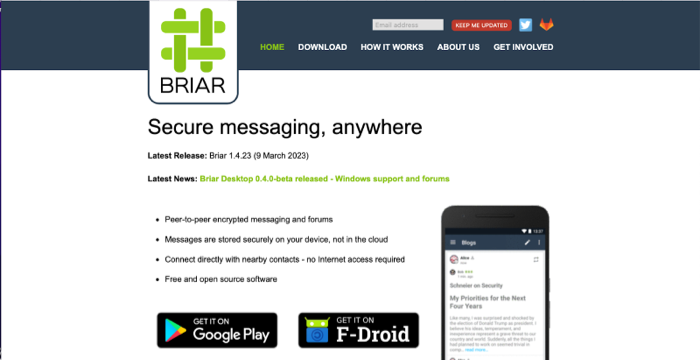
Briar is built for the worst-case scenario: when the internet shuts down. It's a messenger designed for countries where internet is periodically cut off, censorship is pervasive, and communications infrastructure can't be trusted. It works over Bluetooth and WiFi direct (peer-to-peer mesh network) when the internet is unavailable, and over Tor when it is available.
The architecture is peer-to-peer and distributed. There's no central server. Everything is stored on your device. If you want to send a message when the recipient is offline, Briar can relay it through other Briar users until it reaches the destination—a kind of human-powered mesh network. In a protest, a strike, or a blackout, Briar users can form a communications network that doesn't depend on ISPs or cellular infrastructure.
Cost: Free
Type: P2P Mesh Messenger
Learning Curve: Low
Portability: Android (primary)
Briar is Android-only at this point (iOS support is planned but not released). The Android app is straightforward—add contacts via QR code, start messaging. All data is encrypted end-to-end and stored on your device in an encrypted database. There's no Briar account or central service to compromise. Your device is your identity.
The mesh networking is powerful but requires critical mass—you need enough Briar users in your area for the mesh to be effective. In a city with thousands of Briar users, messages can route through multiple hops. In a region with a handful, you're limited to direct connections. For this reason, Briar adoption matters—it's a network tool that gets better as more people use it.
Briar was developed by the Open University and is maintained by a nonprofit foundation. It's designed explicitly for activists and people in hostile environments. The development process includes consultation with at-risk communities, and the threat model reflects real-world persecution rather than theoretical concerns.
The limitations are real. On Android only means people without Android phones can't use it. The mesh networking requires proximity and multiple users, limiting its utility in isolated situations. And the messaging delay (messages might take hours to route through the mesh) makes it unsuitable for urgent real-time communication.
But for resilience and censorship-resistance, Briar is unique. It's the messaging app for people who expect the internet to fail and need to communicate anyway. For a journalist covering a protest that turns into a blackout, or an activist in a country that periodically cuts internet access, Briar is essential infrastructure.
Briar is the right choice when you're operating in a threat model that includes internet shutdowns or infrastructure failure. It's the only major messaging app designed explicitly for mesh networking and offline operation. For normal conditions, Signal is simpler. For worst-case scenarios, Briar is the right tool.
When Briar Wins
- Works without internet (Bluetooth/WiFi)
- Mesh networking for resilience
- No central server or account
- Designed for blackouts/censorship
- End-to-end encrypted
Real Costs
- Android only (no iOS yet)
- Requires network adoption to be effective
- Mesh routing adds latency
- Not designed for real-time chat
- Smaller user base than Signal
Mullvad Browser + Mullvad VPN — The Everyday Stack
Mullvad is unusual in the VPN space because they've explicitly rejected the business model that makes most VPNs unreliable. No email signup. No account at all. No log-in. You download Mullvad VPN, it generates a random ID, you pay with Monero or a gift card, and there's nothing tying the account to your identity. They don't collect logs because there's nothing to log—the architecture itself doesn't store session data.
Mullvad Browser is a collaboration between Mullvad and the Tor Project. It's designed to make every user look identical to prevent fingerprinting—the same user-agent, the same screen resolution, the same canvas fingerprint, the same browsing patterns. The goal is to make you indistinguishable from millions of other Mullvad Browser users, defeating the kind of fingerprinting attacks that would identify you even if your IP is hidden.
Cost: Browser free; VPN ~$5/mo
Type: Browser + VPN Suite
Learning Curve: None
Portability: Full
Mullvad Browser can be run portably from a USB stick. Mullvad VPN installs like a normal application and works on Windows, Mac, and Linux. Together, they form a practical privacy stack for everyday use—not maximum anonymity (that's Tails), but strong privacy with minimal friction. You don't reboot into a new OS. You don't wait for Tor's slowness. You get a hardened browser and privacy-first VPN that work together to prevent tracking.
The architecture is solid. Mullvad VPN routes all your traffic through their infrastructure, which is built specifically to not log anything. They've been legally challenged and have resisted requests for logs. Their technical infrastructure doesn't create logs—the data doesn't exist to hand over. The company has been acquired by a privacy nonprofit (Mullvad AB is now owned by Mullvad Foundation), removing the possibility of a future exit or cash-out forcing a compromise.
The limitations of VPNs as a privacy tool are real and important: a VPN is a trust model, not anonymity. You're moving trust from your ISP (who can see all your traffic) to the VPN provider (who can also see all your traffic, but has committed to not logging it). This trust is important but not absolute. A compromised VPN provider or a targeted surveillance attack could potentially intercept your traffic. VPNs are also not designed to protect against fingerprinting—Mullvad Browser addresses this partially, but a motivated attacker could still potentially identify you.
Mullvad VPN is open source (both the client and server code), which allows security researchers to audit for vulnerabilities. The company publishes transparency reports about legal requests. They've said they can't provide logs because they don't keep them, and they're apparently telling the truth—no major breach has revealed a hidden logging infrastructure.
For journalists, activists, and people who value privacy in their everyday browsing, the Mullvad stack is practical. It doesn't provide maximum anonymity, but it provides real privacy without requiring the operational overhead of Tails or Tor. You can use it daily without friction. You can do authenticated activities (logging into your email, accessing a bank account) because you're not trying to be anonymous—you're trying to hide your activity from ISPs and trackers.
Mullvad is the right choice for privacy in your everyday browsing. It's not designed for anonymity (don't log into personal accounts if anonymity is your goal), but for preventing tracking, hiding your ISP visibility, and protecting against network-level surveillance. It's the practical privacy stack for people who want strong protection without constant friction.
When Mullvad Wins
- No friction for daily use
- No account/login required
- Accepts Monero and gift cards
- Open source (client & server)
- Nonprofit governance
Real Costs
- VPN is trust, not anonymity
- Monthly cost ($5/month)
- Can't use for true anonymity
- Single point of failure
- Mullvad could be compelled
The Honest Closing
No tool makes you invisible. Every tool in this series makes you more expensive to track, but "expensive" is relative. A motivated nation-state actor with access to backbone-level internet infrastructure, the ability to execute zero-days, or compromised endpoints can potentially deanonymize you regardless of tools. That's the hard truth.
What these tools do is make you safe from casual surveillance, law enforcement with normal resources, and corporate tracking. They make you expensive to monitor relative to the value of your information. They protect against passive surveillance by ISPs, network-level eavesdropping, and the automated collection systems that governments and companies run by default on everyone.
Operational security is a practice, not a product. The tools are foundational, but how you use them matters more. Logging into a personal account destroys anonymity. Reusing a username breaks pseudonymity. Accessing something private from a device already tied to your identity undermines every tool in this series.
For journalists and whistleblowers: The Freedom of the Press Foundation publishes detailed operational security guides. The EFF's Surveillance Self-Defense (ssd.eff.org) is the most comprehensive free resource available. Both organizations maintain updated guides for your specific threat model.
For activists and at-risk people: TACTICAL TECH publishes guides for organizing and digital security under repression. Front Line Defenders has context-specific security advice for people at risk. These organizations understand threat models in hostile environments and provide practical guidance aligned with reality.
For everyone else: Start with Mullvad. Use Signal. Enable two-factor authentication on important accounts. The majority of surveillance is automated and mass-scale. Tools that prevent passive surveillance are sufficient for most people most of the time.
Important: This series is for defensive and protective purposes only. Laws regarding privacy tools vary by jurisdiction. Using these tools to evade law enforcement, bypass security systems, or commit crimes is illegal in most places. These tools are designed for people operating legitimately but under surveillance pressure. Use them responsibly and legally.
The goal of privacy isn't to do something wrong. It's to preserve the conditions under which doing something right remains possible.